Serving Text and Tools with an LLM API (feat. OpenAI)
In Coming
Last time we walked through how an LLM basically works and what happens under the hood.
Today I want to take a more practical angle and show how you can actually put a Frontier Model to work.
The term Frontier Model may not be obvious at first, so let’s split the LLMs we commonly use into two categories:
- Frontier Model: trained on an enormous amount of data with a huge number of parameters — large scale models (e.g. GPT, Claude, Gemini …)
- Open source Model: trained on a smaller amount of data with fewer parameters, released for free as open source (e.g. llama, gemma, gpt-oss …)
The models you have experienced through a chat interface — say on chatgpt.com — are all Frontier Models.
Training an LLM and shipping a finished model is out of reach for a small company or one without deep ML expertise. That is exactly why anyone can now build an AI application on top of the LLMs served by companies that do this professionally.
Of course server cost is never free, so you pay based on token usage in return.
In this post we will do the hands-on part with the OpenAI platform, so keep that in mind while following along.
With OpenAI you only need to top up the $5 minimum — the simple examples here do not burn many tokens, so there is nothing to worry about.
The tech stack is as follows:
- language: python 3.14 SDK
- project manager:
uvfor python project management
By the way, the recent trend for python applications is moving toward uv across the board.
uv is written in Rust so it is fast, and it manages virtual envs and loads dependencies in parallel, which makes it very convenient and quick.
Text generation

Let’s start with the easiest thing. Given some input, how do we produce an output?
1
2
uv add openai
uv add python-dotenv
First bring the openai library dependency into the project.
1
2
3
4
5
6
7
8
9
10
11
12
13
14
15
16
17
18
19
20
21
22
23
24
25
26
27
28
import os

from dotenv import load_dotenv
from openai import OpenAI
from openai.types import Reasoning

load_dotenv()
open_ai = OpenAI(api_key=os.getenv("OPENAI_API_KEY"))

# chat completion api
chat_response = open_ai.chat.completions.create(
    model="gpt-5-nano",
    messages=[
        {"role": "system", "content": "You are a helpful assistant."},
        {"role": "user", "content": "What is the capital of France?"},
    ],
    reasoning_effort="minimal"
)
print(chat_response.choices[0].message.content)

# response api
response = open_ai.responses.create(
    model="gpt-5-nano",
    instructions="You are a helpful assistant.",
    input="What is the capital of France?",
    reasoning=Reasoning(effort="minimal")
)
print(response.output_text)
Then I wrote the simple code above. For the model I went with gpt-5-nano, the best bang for the buck.
So what happens when we run it?

It gives us Paris!
We just implemented a feature that tells us the capital of France using an LLM ^-^
But we should look a bit closer, right? Notice that I wrote it in two different styles.
In most cases you can assume you will be using the Chat Completion API.
The Chat Completion API is the very first API format OpenAI offered, and other Frontier model providers have moved toward matching that same format — which means anyone can swap models and keep running their application.
In response, OpenAI shifted its stance toward offering an API that is bound exclusively to its own models. In other words: don’t use other models, become an application that depends on OpenAI models.
The important part is that when we send data, we specify a role and content.
There are three kinds of roles:
- system: text configured by the system
- user: text the user asked
- assistant: response text the LLM generated
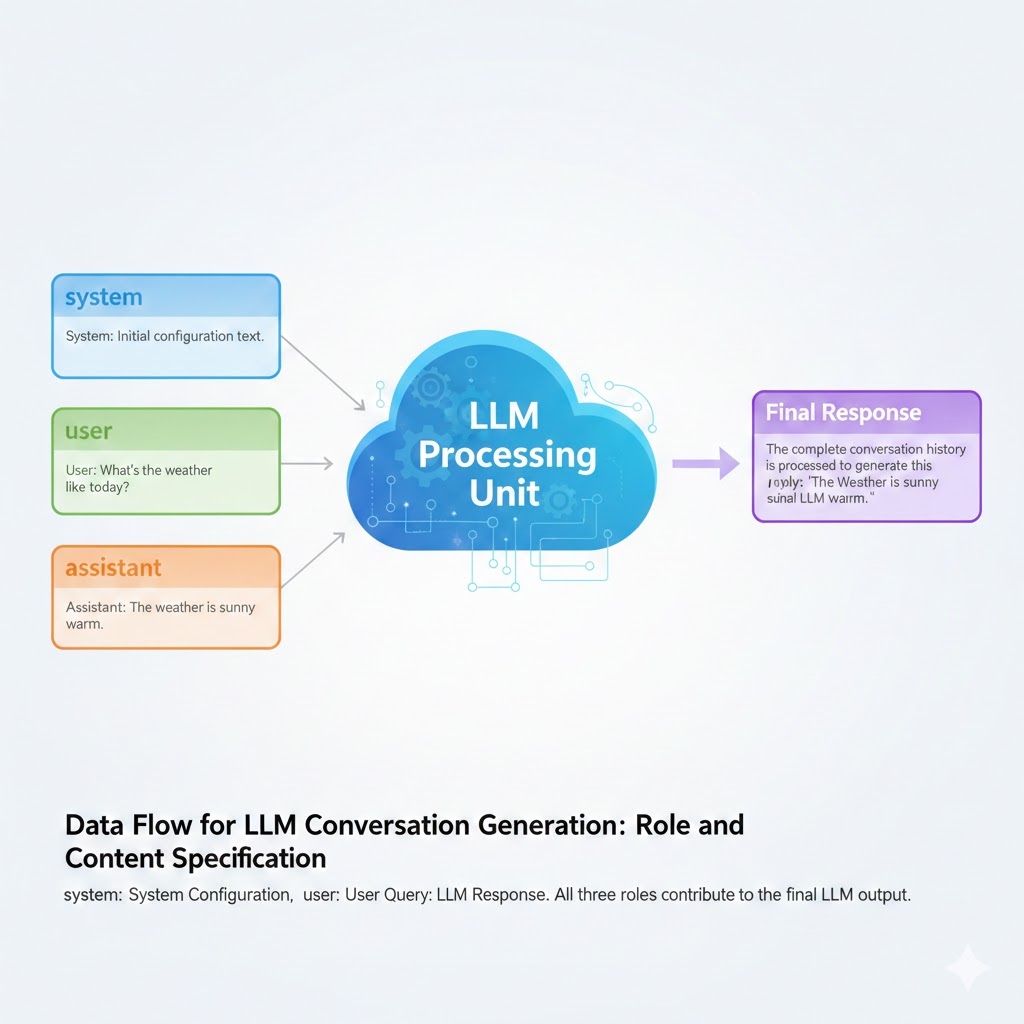
The LLM’s final response is generated by taking all three kinds of data into account.
An LLM by itself holds no state, so a conversational interface has to serialize the entire conversation history, send it over, and only then get the final result.
This is a good place for an AHA moment ^-^
Every query we make through a chat interface is, in fact, turning the whole conversation history into data.
You may have noticed that the longer a conversation gets, the stranger the quality of the LLM’s responses becomes. That is the model wavering about which text to generate because too much Context has piled up.
As we saw in the earlier principles, more Context means countless vectors lined up — and once conflicting or inconsistent vector data appears, the quality of the LLM’s output naturally drops.
That is why Frontier models publish an allowed Context window per model.
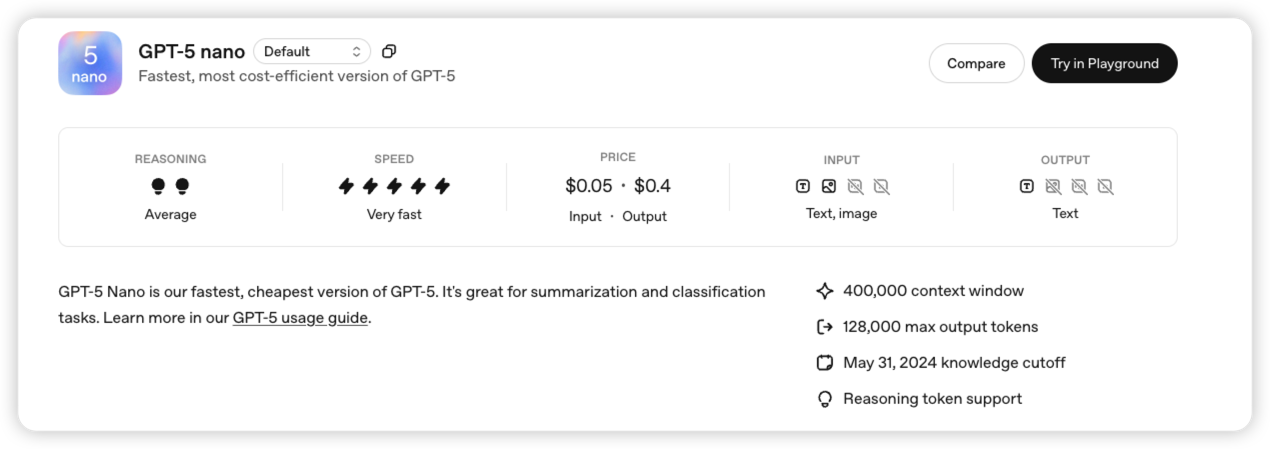 gpt-5-nano
The gpt-5-nano model we used has a context window of up to 400K.
If the result of your query is not satisfying, it is worth checking how much of the context window your conversation is spilling into, and whether the conversation history stays consistent.
The importance of the context window later leads into a topic called Context Engineering when you build AI agent applications.
Tool
Behind the shift from an LLM to Agentic AI is the Tool. Let me explain with an example first.
1
2
3
4
5
6
7
8
9
10
11
12
13
14
15
16
17
18
19
20
21
22
23
24
25
26
27
28
29
30
31
32
33
34
35
36
37
38
39
40
41
42
43
44
45
46
47
48
49
50
51
52
53
54
55
import os

from dotenv import load_dotenv
from openai import OpenAI
from openai.types import Reasoning

load_dotenv()
open_ai = OpenAI(api_key=os.getenv("OPENAI_API_KEY"))

tools = [
    {
        "type": "function",
        "name": "get_weather",
        "description": "Get current temperature for a given location.",
        "parameters": {
            "type": "object",
            "properties": {
                "location": {
                    "type": "string",
                    "description": "City and country e.g. Bogotá, Colombia",
                }
            },
            "required": ["location"],
            "additionalProperties": False,
        },
        "strict": True,
    },
]

response = open_ai.responses.create(
    model="gpt-5-nano",
    input="What is the weather like in Paris today?",
    tools=tools,
    reasoning=Reasoning(effort="minimal")
)
print(response.output[1].to_json())

def get_weather(location):
    # call a real weather API (hard coded in this example)
    return f"The current temperature in {location} is 15°C with clear skies."

# tool call implementation (response API)
for item in response.output:
    if item.type == "function_call":
        if item.name == "get_weather":
            location = item.arguments
            # call a real weather API (hard coded in this example)
            weather_info = get_weather(location)
            # hand the tool call result back to the model
            follow_up_response = open_ai.responses.create(
                model="gpt-5-nano",
                input=f"The weather information for {location} is: {weather_info}",
                reasoning=Reasoning(effort="minimal")
            )
            print(follow_up_response.output_text)
Right now we are invoking the Tool directly, so the code looks pretty gnarly hehe…
Later on, an AI agent library will take care of this kind of boilerplate so we never have to touch it directly. Look forward to the next post~!
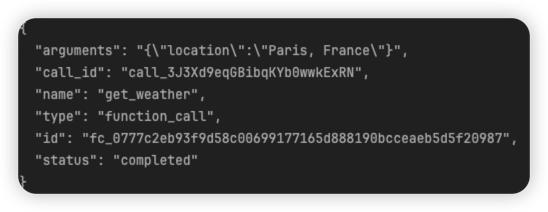
Anyway, to explain the code above in broad strokes: it makes a total of two LLM API calls.
The print from the first call looks like this,
and the print from the second call looks like this.
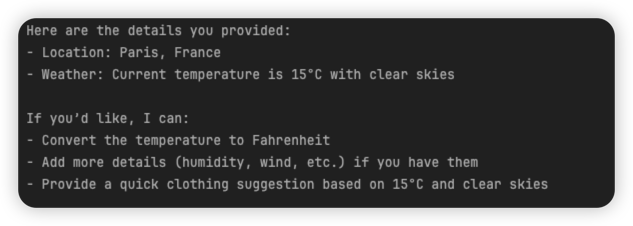
We handed the LLM a get_weather tool, and the first print is the LLM asking for the result of using that tool. It even decided which function to call and which arguments to pass, and told us in JSON form.
The second print is the final response, produced by combining the user’s query with the function’s return value.
Drawn as a picture, it looks like this.
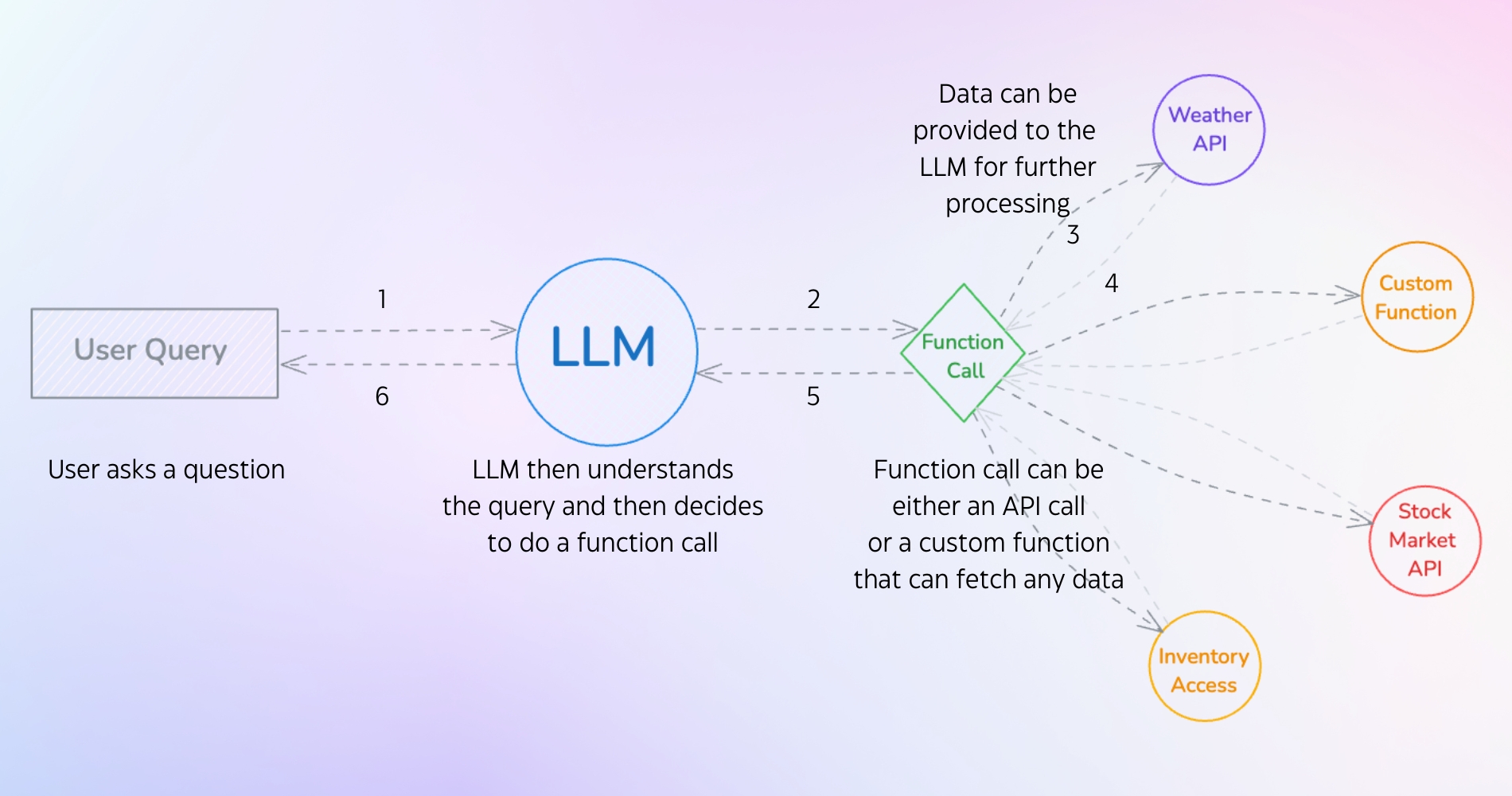
A Tool, put simply, means an instrument the LLM can use. It refers to a function the developer defines — you run the function locally and pass its result back to the LLM.
Tools can take many forms:
- RAG retrieval: querying through RAG
- API call: calling an API
- DB query: querying a DB
Because of Tools, an LLM really can do anything. It moved from being a simple text predictor to having a foundation for acting on its own.
And that is why MCP (Model Context Protocol), which standardizes tools across every model, has been getting so much attention.
Here is another AHA moment ^-^
Depending on which tools you give the LLM, the AI application you design can take wildly different shapes — and you can draw a clear boundary around what it is allowed to do.
So how you define a Tool, and how you write the description for it, can change the outcome completely.
Conclusion
Today we worked through two APIs with hands-on examples.
Through Text generation we looked at the importance of the context window and the actual data structure,
and through Tool we looked at how tools work and why they matter.
Now that we have the basics for becoming an AI Engineer, I’ll come back with a more advanced take on Agents in the next post!