What an AI Agent Is, and Giving Tools to an Agent (feat. OpenAI)
In Coming
Last time we learned how to call a very basic LLM API and use a tool in a simple way.
If you are curious about that, take a look at the previous post first.
The problem is that writing that complicated tool-related python code every time mass produces boilerplate,
and the more tools you have, the messier the code gets.
In this post we will take a quick look at the AI agent libraries that showed up to solve exactly that pain.
There are countless AI agent libraries out there, but since we are going to use OpenAI models, I will explain things based on OpenAI Agents~!
AI Agent
Before we jump in — what is an AI agent? What exactly are we calling an AI agent?
The definition of an AI agent has shifted over time, but personally I define it like this:
LLM with tools in a loop to achieve a goal.
In other words, anything that runs to reach a given goal by way of some tools is what we call an AI agent.

How does a plain LLM — a next token predictor — end up judging things actively and autonomously to reach a goal?
All of this became possible while keeping the LLM's next-token prediction exactly as it is, by adding an interface for passing tools back and forth.
By writing a description for a tool, the model predicts which tool to use in which situation and what result it will get from it, and then runs it.
And it is not limited to a single tool call — when there are several tools, the model calls them repeatedly as the situation demands until the goal is met.
OpenAI agents
OpenAI Agents is the agent library provided by OpenAI.
It offers a variety of features (Handoff, Guardrail, Agent as tool, Trace …), and I plan to introduce them one at a time as the situations come up hehe
Today I will explain a very basic Agent along with example code.
1
uv add openai-agents
Pull in the openai-agents dependency with the command above!
First, do you remember the code we wrote earlier without an agent library?
1
2
3
4
5
6
7
8
9
10
11
12
13
14
15
16
17
18
19
20
21
22
23
24
25
26
27
28
29
30
31
32
33
34
35
36
37
38
39
40
41
42
43
44
45
46
47
48
49
50
51
52
53
54
55
import os

from dotenv import load_dotenv
from openai import OpenAI
from openai.types import Reasoning

load_dotenv()
open_ai = OpenAI(api_key=os.getenv("OPENAI_API_KEY"))

tools = [
    {
        "type": "function",
        "name": "get_weather",
        "description": "Get current temperature for a given location.",
        "parameters": {
            "type": "object",
            "properties": {
                "location": {
                    "type": "string",
                    "description": "City and country e.g. Bogotá, Colombia",
                }
            },
            "required": ["location"],
            "additionalProperties": False,
        },
        "strict": True,
    },
]

response = open_ai.responses.create(
    model="gpt-5-nano",
    input="What is the weather like in Paris today?",
    tools=tools,
    reasoning=Reasoning(effort="minimal")
)
print(response.output[1].to_json())

def get_weather(location):
    # call a real weather API (hard coded in this example)
    return f"The current temperature in {location} is 15°C with clear skies."

# tool call implementation (response API)
for item in response.output:
    if item.type == "function_call":
        if item.name == "get_weather":
            location = item.arguments
            # call a real weather API (hard coded in this example)
            weather_info = get_weather(location)
            # hand the tool call result back to the model
            follow_up_response = open_ai.responses.create(
                model="gpt-5-nano",
                input=f"The weather information for {location} is: {weather_info}",
                reasoning=Reasoning(effort="minimal")
            )
            print(follow_up_response.output_text)
As above, we defined the tool’s json schema by hand, called the python function when the tool was invoked, and passed the result back to the LLM.
With OpenAI Agents all of that collapses into this:
1
2
3
4
5
6
7
8
9
10
11
12
13
14
15
16
17
18
19
20
21
22
23
24
25
26
27
28
29
30
from agents import Agent, ModelSettings, Runner, function_tool
from dotenv import load_dotenv
from openai.types import Reasoning

load_dotenv()


@function_tool(docstring_style="google")
def get_weather(location: str) -> str:
    """Get current temperature for a given location.

    Args:
        location: City and country e.g. Bogotá, Colombia

    Returns:
        A concise weather sentence that includes Celsius temperature and a condition summary.
    """
    return f"The current temperature in {location} is 15°C with clear skies."


weather_search_agent = Agent(
    name="weather_search_agent",
    instructions="""
    You are a weather assistant. For weather-related requests,
    call the `get_weather` tool to get weather information and respond with a concise summary.
    """,
    model="gpt-5.4-nano",
    model_settings=ModelSettings(reasoning=Reasoning(effort="none")),
    tools=[get_weather],
)
How about that? Much simpler, right?
All you need is the function_tool decorator shipped with OpenAI Agents, and you can hand the tool definition straight to the Agent.
That decorator builds the json schema for you, and the LLM reads it to decide when it should reach for the tool.
So shall we go verify that it really works?
1
2
3
4
5
6
7
8
9
def main() -> None:
    query = "What is the weather in Seoul today?"
    result = Runner.run_sync(weather_search_agent, input=query)
    print(json.dumps(get_weather.params_json_schema, indent=2, ensure_ascii=False))
    print(result.final_output)


if __name__ == "__main__":
    main()
Above is a small runnable snippet that both executes the agent and lets us inspect the schema of the tool we made.
Running it, the json schema comes out like this:
1
2
3
4
5
6
7
8
9
10
11
12
13
14
15
{
  "properties": {
    "location": {
      "description": "City and country e.g. Bogotá, Colombia",
      "title": "Location",
      "type": "string"
    }
  },
  "required": [
    "location"
  ],
  "title": "get_weather_args",
  "type": "object",
  "additionalProperties": false
}
Nearly identical json to what we hand wrote, isn’t it?
Generating this kind of boilerplate for free is one of the big wins of using an Agent library (on top of all the extra features).
You can easily check how the Agent call went on the OpenAI Platform.
The OpenAI platform is a page for AI Engineers, with all sorts of features — Observability, Evaluation, Fine tuning, Billing and more.
Only I can see it since it is tied to my paid plan, so let me share what it looks like through captures hehe
 trace
trace
You can see everything bundled into a single trace for the agent. There were 2 LLM API calls in total, and 1 tool use.
Let me walk through them in order.
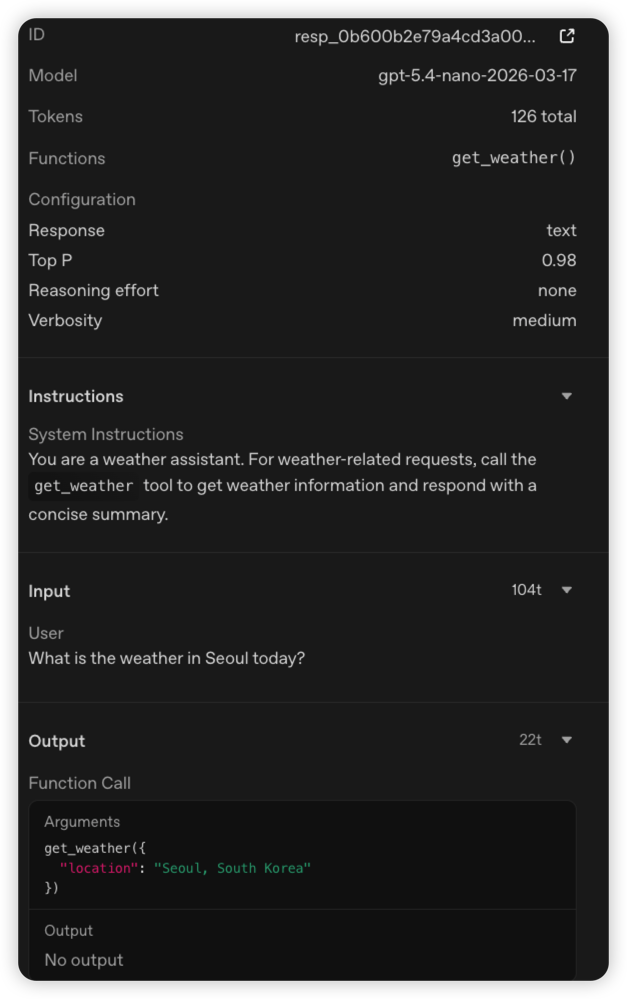 1st LLM call
The first LLM call derived an output from the user’s input and the instructions.
That output expressed the get_weather call and how to fill in the parameter (location) to pass along.
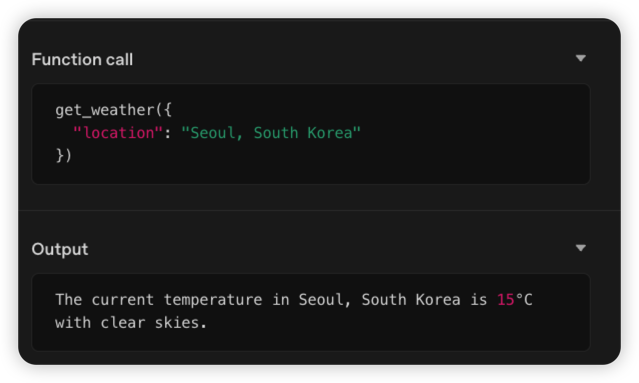 1st tool call
Next is the tool call. The python code ran locally, and it shows the result for the given argument.
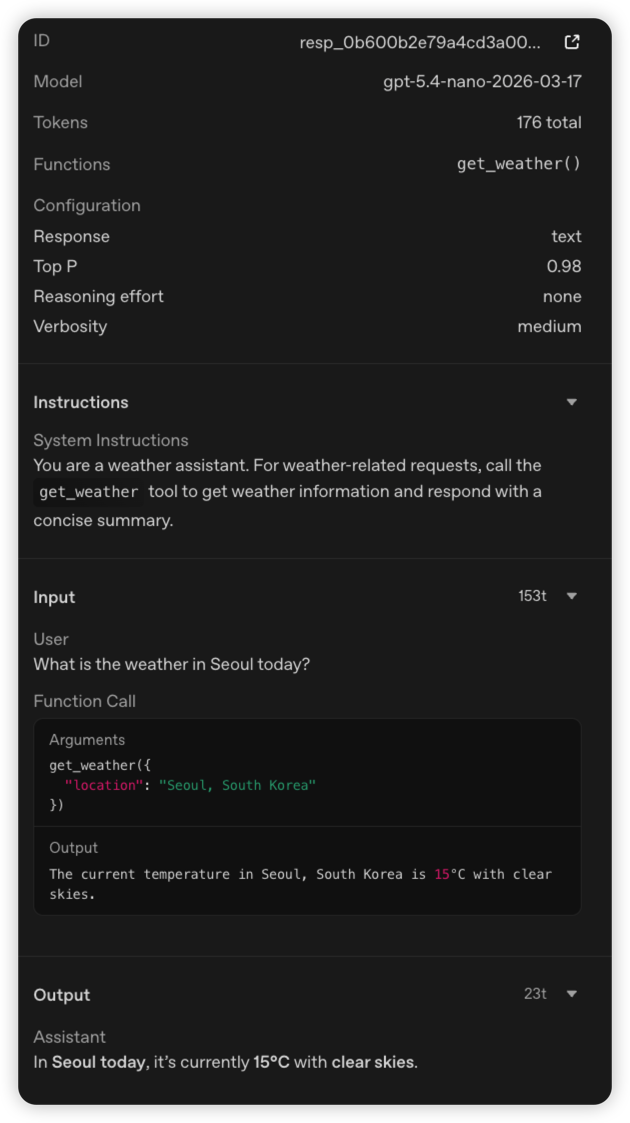 2nd LLM call
Finally the second LLM API call, where the tool’s result is handed to the LLM to draw out the final output.
So there it is — our weather_search_agent reached its final goal (“what’s the weather in Seoul today?”) through a tool that fetches the weather.
This was a simple example, but once you provide a variety of tools, harder and more complex situations trigger many tool calls, and the agent goes through a whole journey to reach the final goal.
Conclusion
It would be a fun exercise to take the things you do by hand and define a personalized Agent to accomplish them for you.
Decide what work to delegate to the Agent and which Agent library to use to reach the goal — then actually build it and experiment~!
Next time we will go through more advanced Agent patterns and look at which pattern fits which situation ^^