Apache Kafka Producer - Partitioning, Retries & Idempotence
In Coming
Last time we walked through how a Kafka Consumer actually works — Apache Kafka Consumer - A Deep Dive into HeartBeat & Rebalancing.
What we never got around to was the Producer side, so that is what this post is about.
Producer
Before anything else: what is the Producer’s job?
The way I think about it, the Kafka Producer owns exactly one responsibility — sending messages to the Broker.
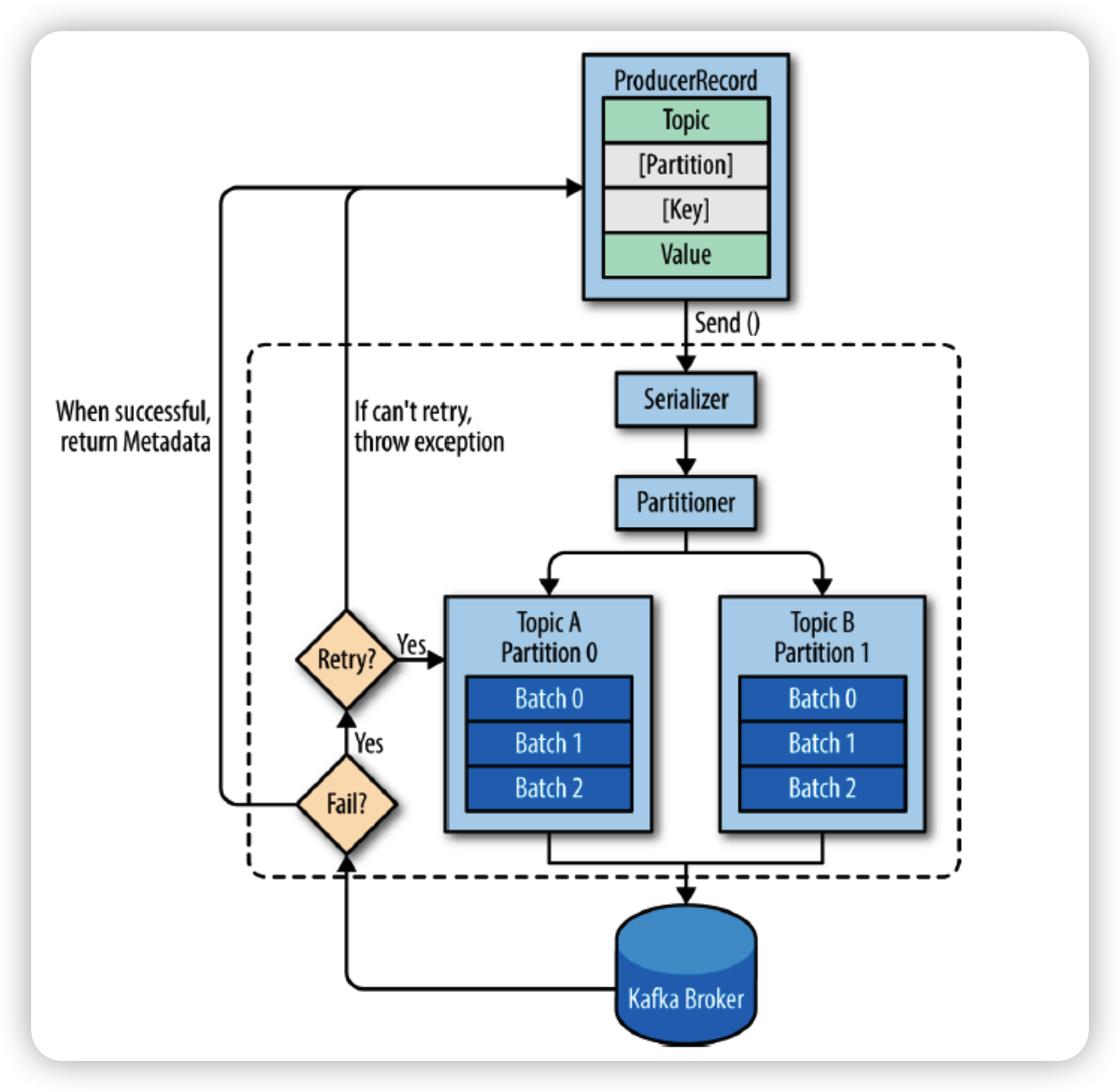 Kafka Producer
But “sending” hides a bunch of decisions. The Producer holds a whole strategy for how the data goes out:
- Which Serializer do we use to send the data?
- Do we compress the data before sending it?
- Which Partition does the data go to?
- What is the retry strategy?
Those four decisions are the Producer. Let’s take them one at a time.
Serializer
There are two serialization choices to make, because there are two pieces of data.
The key is the data used as the basis for choosing a partition. The value is the data actually written to the Kafka topic.
| Configuration | Default | Description |
|---|---|---|
key.serializer | - | Strategy for serializing the key |
value.serializer | - | Strategy for serializing the value |
So you pick a serialization strategy for each of the two.
Compression
Compression is exactly what it sounds like.
On the client side, once your payloads get big, network cost gets expensive — so you compress before sending. Compression happens at the ProducerRecord level.
| Configuration | Default | Description |
|---|---|---|
compression.type | none | Compression strategy for Producer Record data (gzip, snappy, lz4, zstd) |
Partitioner
Partitioning is the strategy for deciding which partition a record gets sent to.
Remember the key we serialized above? That key is exactly what this decision is based on.
| Configuration | Default | Description |
|---|---|---|
partitioner.class | org.apache.kafka.clients.producer.internals.DefaultPartitioner | Selects the Partitioner strategy |
batch.size | 16384 | The maximum size of data the Producer can send at once. Note that this is a ceiling, not a guarantee that it always sends a full batch |
linger.ms | 0 | How long the Producer waits before sending. The longer it waits, the more data it can accumulate toward batch.size |
The partitioner options themselves:
DefaultPartitioner: if a key exists, choose based on its hash; if no key exists, it falls back to theUniformStickyPartitionerstrategyRoundRobinPartitioner: assign partitions one by one, in orderUniformStickyPartitioner: whenbatch.sizefills up orlinger.msis exceeded, send all accumulated data to a single partition
Understand just those three options and you can tune Producer performance to fit your situation.
UniformStickyPartitioner is the one that trips people up the most.
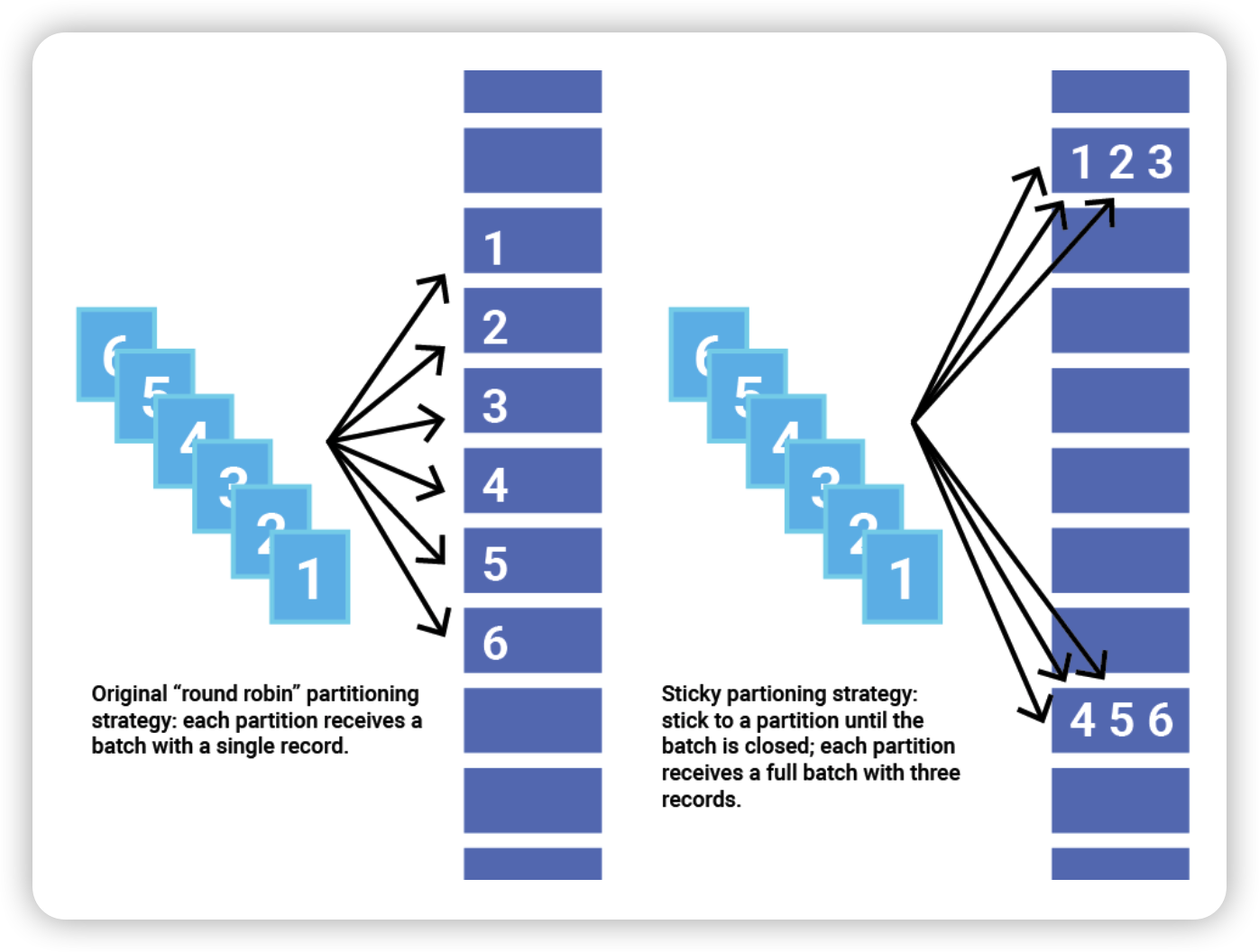 Partitioning strategy
Put simply: the records get split up by which partition receives them, in batch.size-sized chunks.
You might be suspicious about the performance here, but it is supposed to be quite good — the fact that DefaultPartitioner itself picks the sticky approach when there is no key tells you something.
Why is it good? Because if you tune linger.ms to a reasonable value, you are no longer paying network cost on every single record. Batching lets you save that cost and handle everything in one shot. The trade-off is that batching uses a bit more memory.
For the details, this is worth a read: Apache Kafka Producer Improvements: Sticky Partitioner
Retry Strategy
Two questions:
- What happens when the Producer fails while sending a message?
- How do we know a message was successfully sent?
Let’s dig in via the configuration.
| Configuration | Default | Description |
|---|---|---|
retries | 2147483647 | How many times to retry a record send that failed with an error. It does not retry forever, though — retries only happen within delivery.timeout.ms. So the recommendation is to tune the timeout value, not retries |
delivery.timeout.ms | 120000ms = 2 min | The upper bound on how long a Producer send call has before it must report success or failure. Keep delivery.timeout.ms >= linger.ms + request.timeout.ms |
linger.ms | 0 | How long the Producer waits before sending. The longer it waits, the more data it can accumulate toward batch.size |
request.timeout.ms | 30000 = 30 sec | The maximum time the Producer client waits for a response to a request |
People usually reach for retries to control retry behavior, but the value you should actually be setting is delivery.timeout.ms.
There is a catch, though: retries can cause duplicate records.
For example, when a network timeout happens and the client never receives a response, it retries.
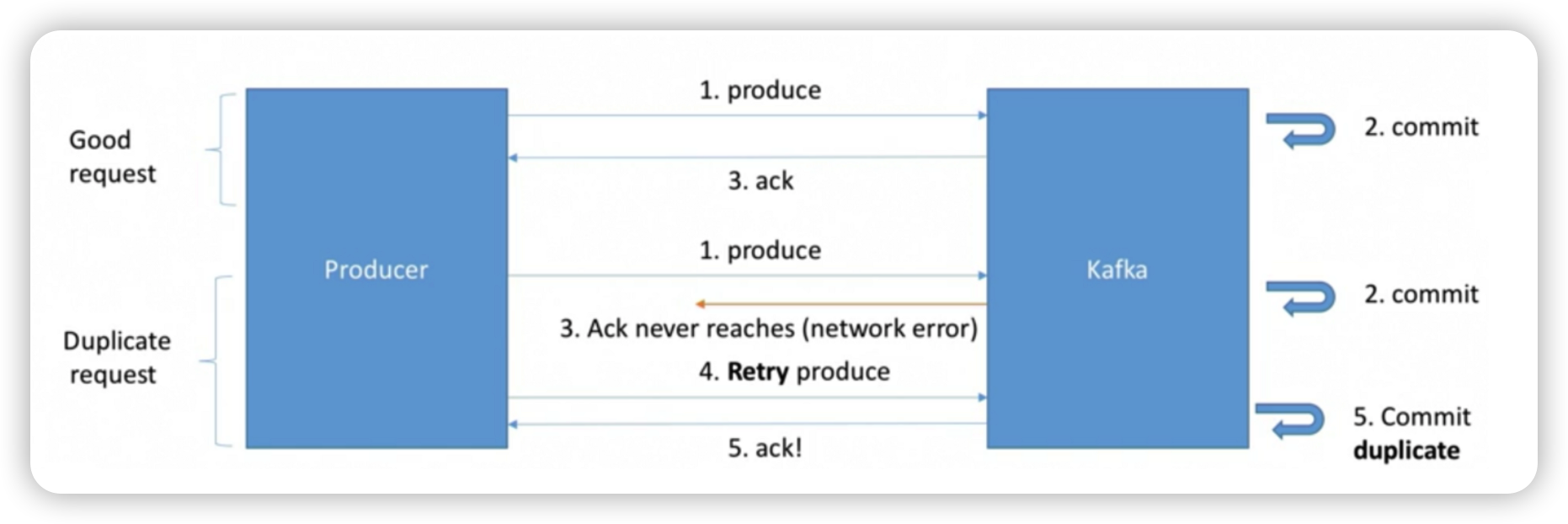 Message publish cases
Since a retry fires whenever the ack fails to arrive, this is exactly the case where a message can get duplicated.
So how is the ack decided, and how do we prevent duplicate publishes?
| Configuration | Default | Description |
|---|---|---|
acks | all | How many replica acknowledgements the partition Leader must confirm after the Producer sends a request. 0: the Producer only fires and never checks whether it was received 1: written to the Leader’s partition, and the ack reports that the replicas still have to write it all: the Producer is notified once it is confirmed written to all partitions |
enable.idempotence | true | Guarantees idempotence — whether the Producer allows a record write exactly once |
So how does enable.idempotence actually work?
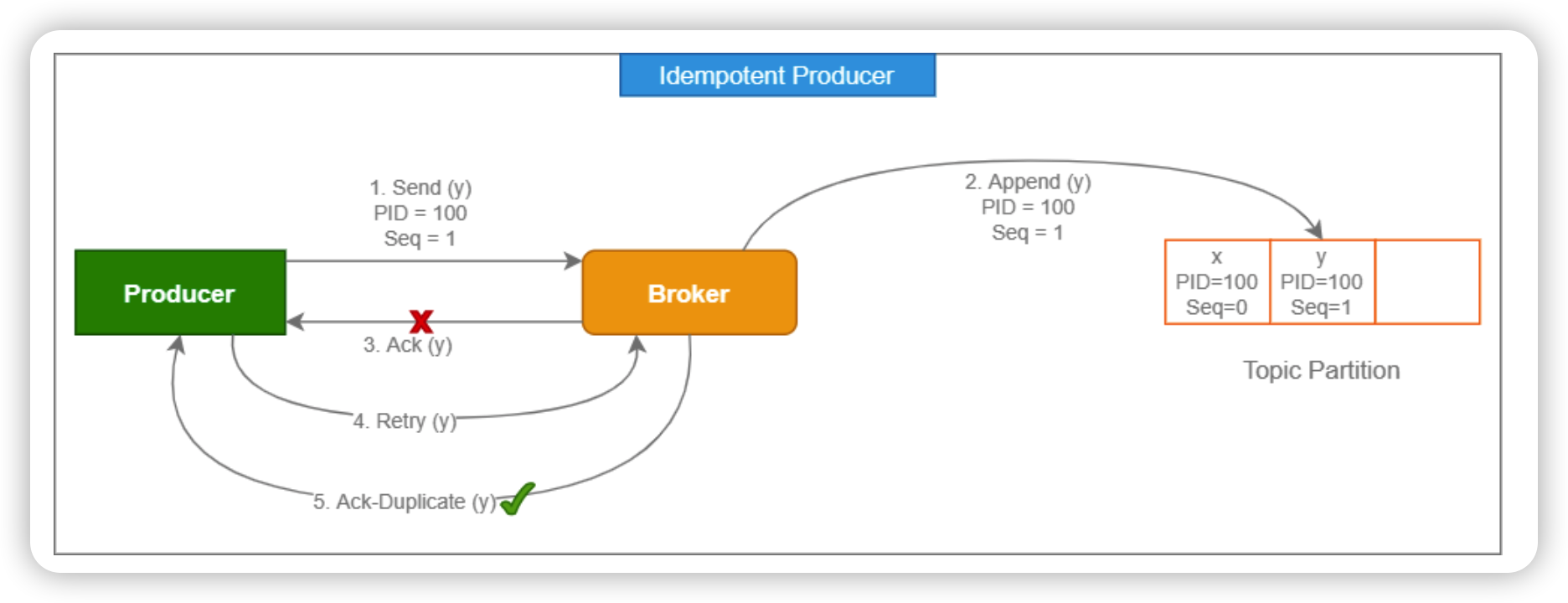 Producer idempotence guarantee
Through a PID (ProducerId), which is used to track which Producer wrote which record.
The Producer sends its PID along with the request, and the Broker handling it uses that PID to dedupe — so the record’s write happens exactly once.
This option ties directly into message delivery semantics, and it is the option that guarantees idempotence on the Producer side, which makes it extremely important.
Definitely one to remember.
Wrapping Up
Today we looked at the Producer’s flow — how it sends messages, and how it can guarantee idempotence.
It is a lot to hold in your head at once, but since sending is the result of each of these components working together, it is worth organizing the components in your mind. :)
Next up: Kafka’s Message Delivery Semantics, pulling the Producer and Consumer sides together.