Apache Kafka Consumer - A Deep Dive into HeartBeat & Rebalancing
In Coming
This time let’s look at how a Consumer actually does its consuming.
Everything below assumes you are using the spring-kafka module.
Consumer
First of all, what is a Kafka Consumer? What is it made of?
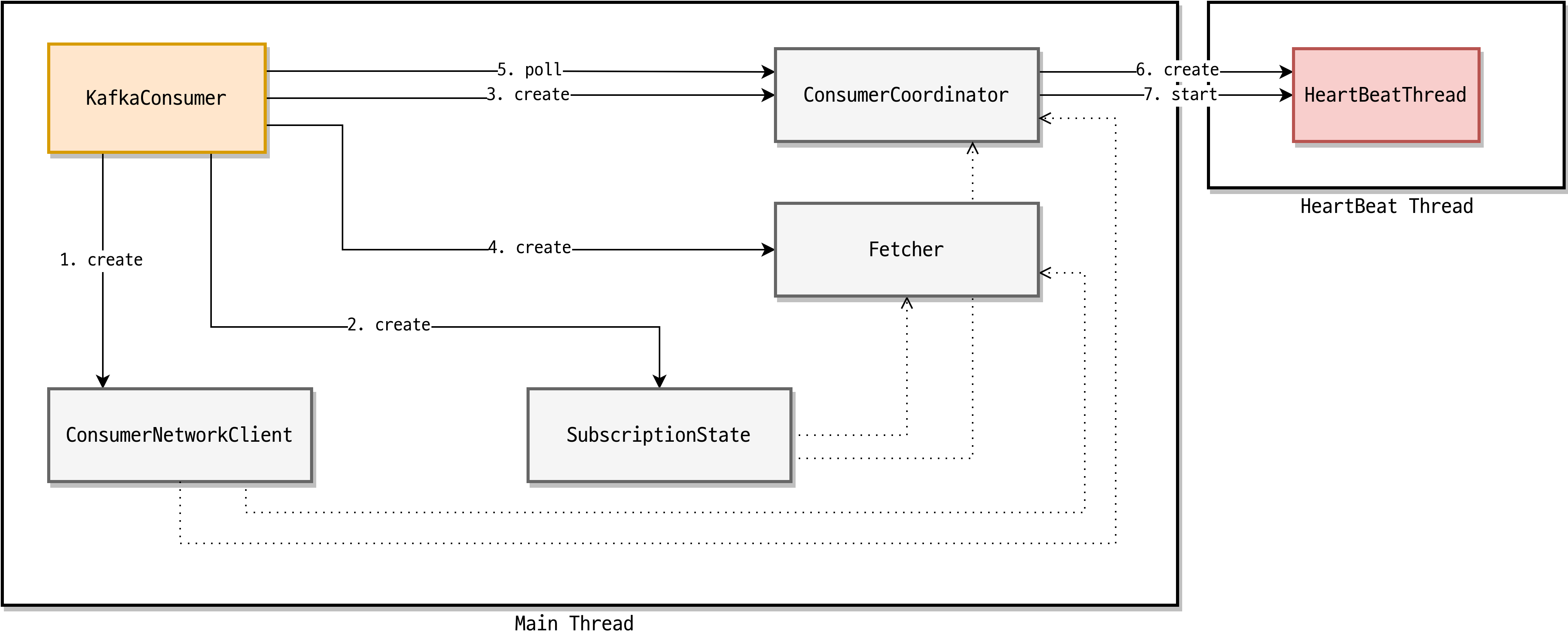 Kafka Consumer structure
There is a lot going on there, so it looks intimidating at first. Let’s take it one piece at a time.
| Component | Responsibility |
|---|---|
ConsumerNetworkClient | Handles all network communication for the Kafka Consumer |
SubscriptionState | Stores and manages Topic / Partition / Offset information |
ConsumerCoordinator | Handles consumer rebalancing, and offset initialization & commits |
HeartBeatThread | Runs in the background and tells the Coordinator that the Consumer is alive |
Fetcher | Pulls data from the broker |
That table is the short version of each responsibility. If you want the detailed mechanics, KafkaConsumer Client Internals is worth a read.
Personally, I think the two most important pieces here are the Fetcher and the HeartBeatThread.
To actually operate Kafka in production, you need to understand how consumers stay alive and how they work internally — because every time you deploy a new version of your application, the consumers that were running die and new consumers come up in their place.
Fetcher
Put simply, the Fetcher is what pulls the data sitting in a Kafka topic.
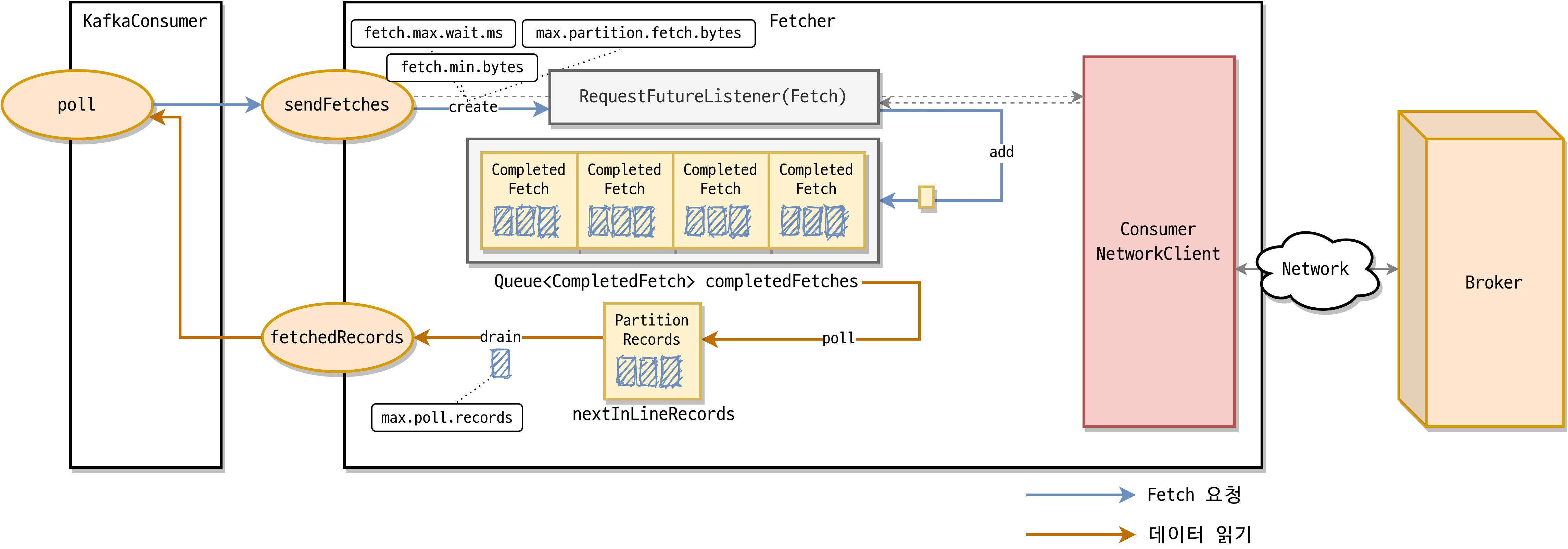 Kafka’s Fetcher
As you can see in the diagram, the consumer fetches data according to how much data you tell it to fetch — max.partition.fetch.bytes and fetch.min.bytes.
fetch.min.bytesdefaults to 1 bytemax.partition.fetch.bytesdefaults to 1 mebibyte, roughly 1.048 MB
Just as important as the data size is the number of records you fetch, which is controlled by max.poll.records (default: 500).
So what should you do if you want reliable, regular polling?
Set max.poll.records to 1.
To understand why, we need to look at how polling works together with the HeartBeat that signals the Consumer is alive. Let’s dive in.
HeartBeatThread
As mentioned above, the HeartBeatThread runs in the background and reports liveness to the Coordinator.
Before this thread existed, Kafka judged whether a consumer was alive or dead based on data processing itself. But mixing data processing and health checking meant that whenever processing took a long time, there was no way to tell immediately whether the consumer was alive or dead. The solution was to keep a separate thread.
The key point: the part that processes data and the part that signals the Consumer is alive have been separated.
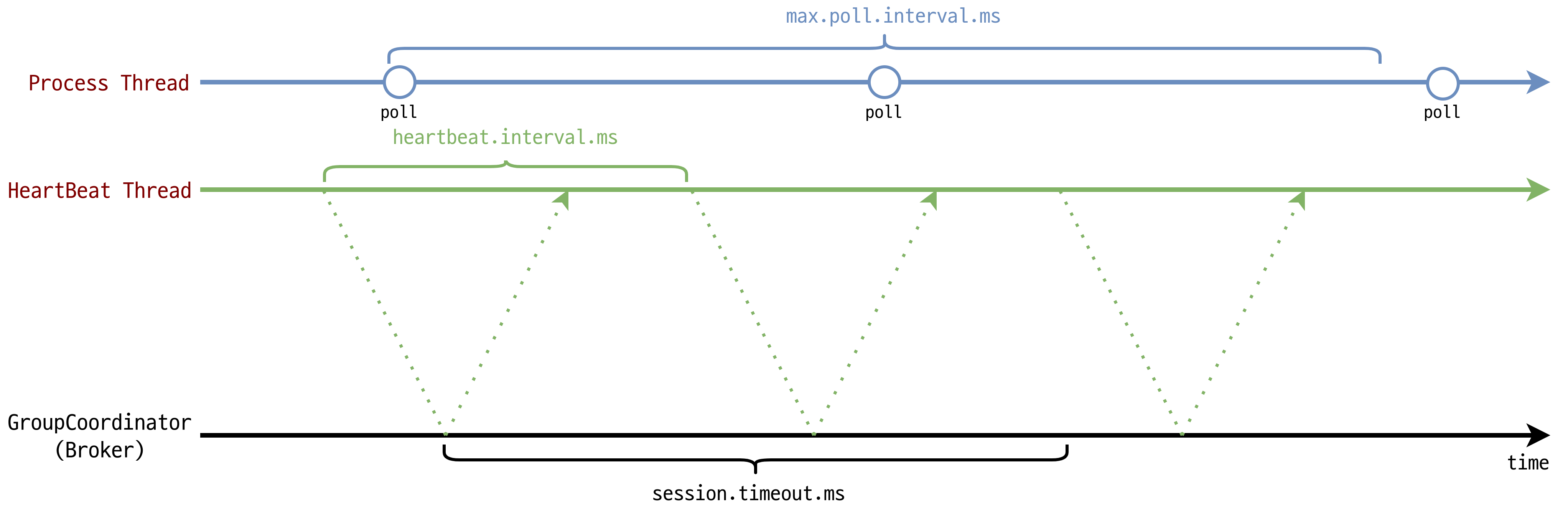 HeartBeat runs in the background
In other words, the polling interval and the heartbeat interval are now decoupled.
| Option | Policy |
|---|---|
max.poll.interval.ms(default = 300000ms = 5 min) | The poll method must be called within this window. If poll is not called in time, the consumer is removed from the group. The HeartBeat thread is what measures the interval between poll calls. |
heartbeat.interval.ms(default = 3000ms = 3 sec) | A HeartBeat is sent to the Group Coordinator on this interval. Commonly set to 1/3 of session.timeout.ms (a consumer cannot stay in the group beyond session.timeout). |
session.timeout.ms(default = 10000ms = 10 sec) | If no HeartBeat arrives within this window, the Group Coordinator removes the consumer from the group. |
Now — we introduced the option that controls how many records get polled above. So why is setting max.poll.records to 1 the right call?
Because max.poll.records is exactly what affects max.poll.interval.
If a logic problem causes a delay while processing polled data (processing that happens in your application), then the poll interval naturally stretches out as well — and the delay grows in proportion to the number of records.
The result: your application is perfectly alive, but the consumer can’t consume properly, and you end up with an incident where Kafka records simply aren’t being consumed.
In short, if you approach max.poll.records as “oh, that’s just the setting that lets me process more records at once,” you’re in for real trouble.
The term Group keeps coming up in this explanation. Kafka consumers don’t work alone — they consume as a Group made up of several consumers.
Group?
So let’s cover the concept of a Group first.
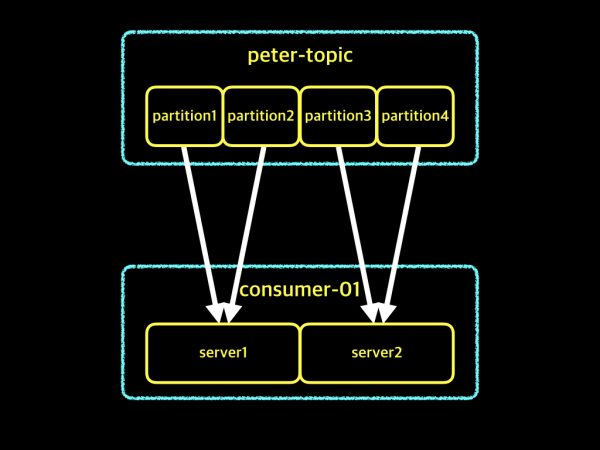 Consuming happens at the Consumer Group level
A Group is the set of consumers that consume the multiple partitions of a single topic.
So how do you set the group id in your application?
1
@KafkaListener(topics = "account", groupId = "group-id")
By specifying the topic name and the group id like this, you create the group that does the consuming.
Now, there will be several consumers within a group. How do we decide whether the consumers in the group are alive?
By the polling deadline — max.poll.interval.ms. If a consumer inside the group stalls past that deadline, the stalled consumer is excluded and the remaining consumers take over the polling.
Then who manages the group? The Group Coordinator.
The Group Coordinator is responsible for managing the Consumer Group. Kafka performs rebalancing whenever consumers are dynamically created or removed (instances being added or deleted), and the Group Coordinator plays the most important role in that process.
Rebalancing
This is a genuinely tricky situation. On what grounds do Kafka consumers end up rebalancing?
Earlier we used HeartBeats to judge whether a consumer is alive or dead. Whenever the number of consumers in a Kafka group changes, rebalancing takes place. Likewise, if there is a change to the topic, rebalancing takes place as well.
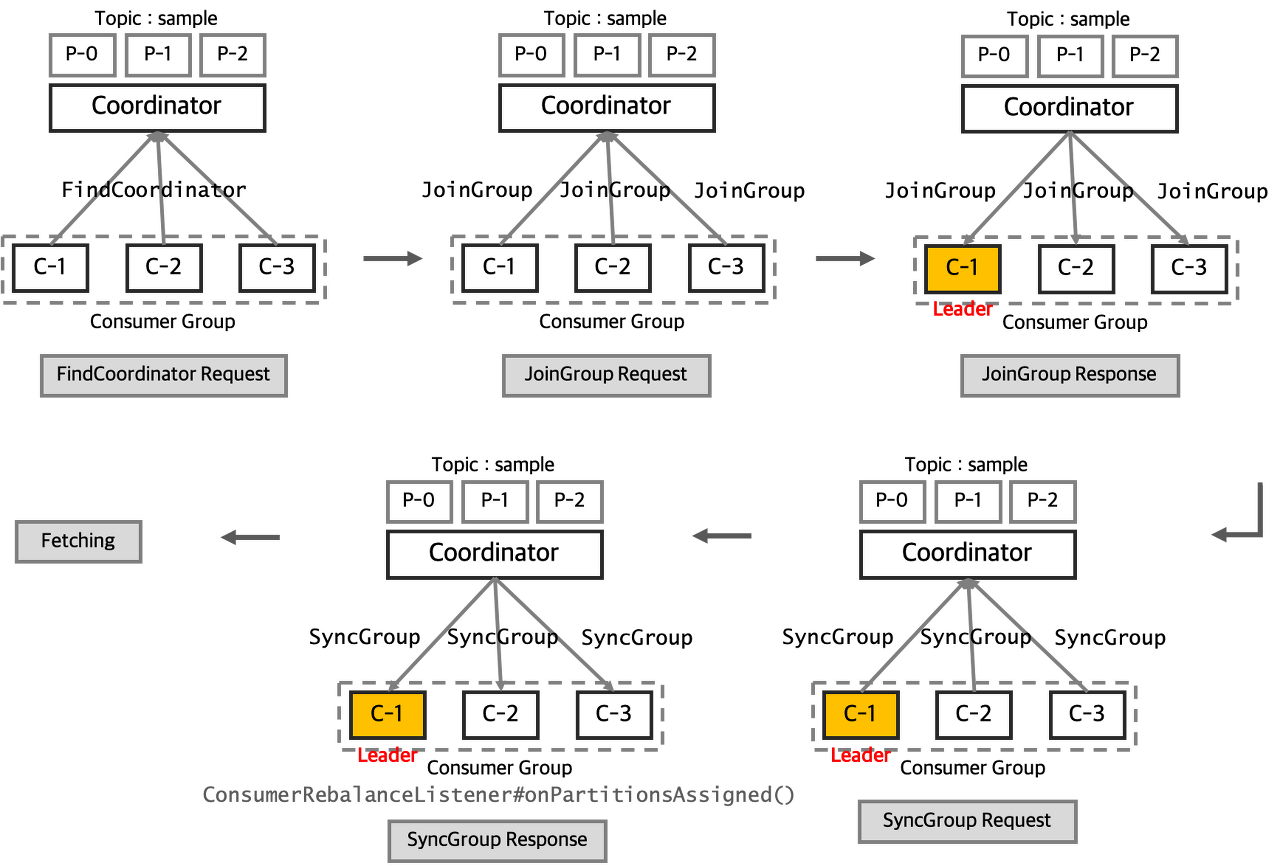 Kafka Rebalancing
The overall flow is:
- FindCoordinator Request: the Consumer Coordinator finds the Group Coordinator to send its JoinGroup request to
- JoinGroup Request: group information and subscription information are collected, and a leader is elected
- SyncGroup Request: the leader assigns partitions to the consumers in the group and sends that information to the Group Coordinator
While Kafka is rebalancing, all consuming (data fetching) stops — a Stop The World (STW) situation.
Which is why the people who built Kafka work so hard to shrink that STW window.
Wrapping Up
When we say we’re “using Kafka,” there is a lot we end up glossing over without ever knowing.
Configuration values and everything around HeartBeats are genuinely critical elements when you’re operating a system — so taking another look at them before you operate is really, really important.