Gradle multi module(project) with Spring Boot (feat. Kotlin)
In Coming
Most projects these days are structured with multi modules in mind.
Teams split their code into multiple modules to separate each module’s responsibility and to push reusability further.
But the moment you split into multi modules, the biggest pain point that shows up is having the same build configuration duplicated across every module.
To solve exactly that, Gradle offers modules called buildSrc and build-logic, which let you unify the duplicated build configuration in one place.
Let’s take a look at how they work.
Multi Project Build basic
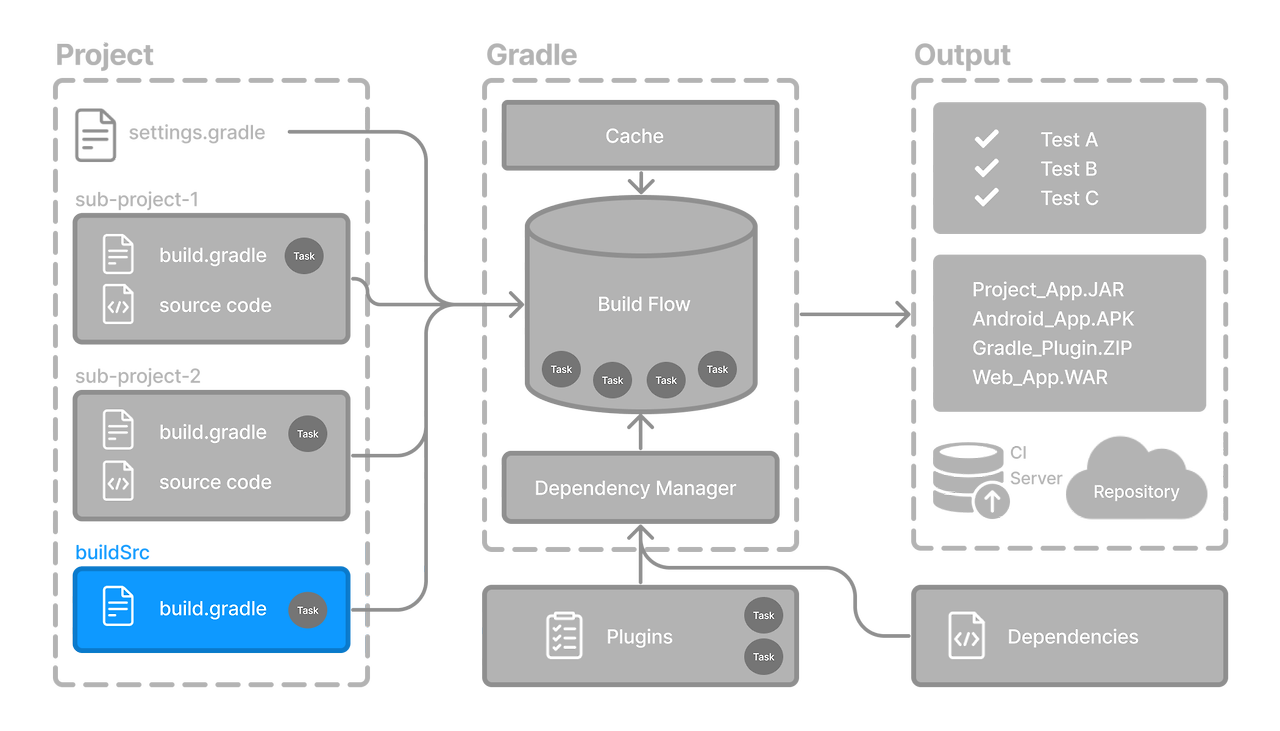
The overall Gradle overview looks like the diagram above.
Gradle takes the scripts configured on the project as input, pulls in the plugins and dependencies, and builds a build flow that follows the task ordering.
The final artifacts then come out as a jar file, or as any number of other file types.
Notice the box labelled buildSrc highlighted in blue in the diagram. Let’s dig into that a bit more.
buildSrc

The role of buildSrc is to provide reusable logic for the build scripts used by each project.
The benefits you get from creating a buildSrc are:
- Reusable build logic: since you extract the common logic into one place, it becomes reusable.
- Isolation from the main build: you can apply whichever build logic you want per project, and flexibly decide whether it’s included in the main build.
- Automatic compilation: buildSrc always gets a high compilation priority, and you can write all kinds of scripts to automate things.
- Easy testing: you can test just the custom build logic on its own, so there’s no need to create a project to test it.
- Gradle plugin development: when writing a plugin, you can put it in buildSrc and apply it to whichever projects you want.
To put it simply: you get to write and operate build scripts however you like.
build-logic
OK, so buildSrc makes sense — but then what is build-logic?
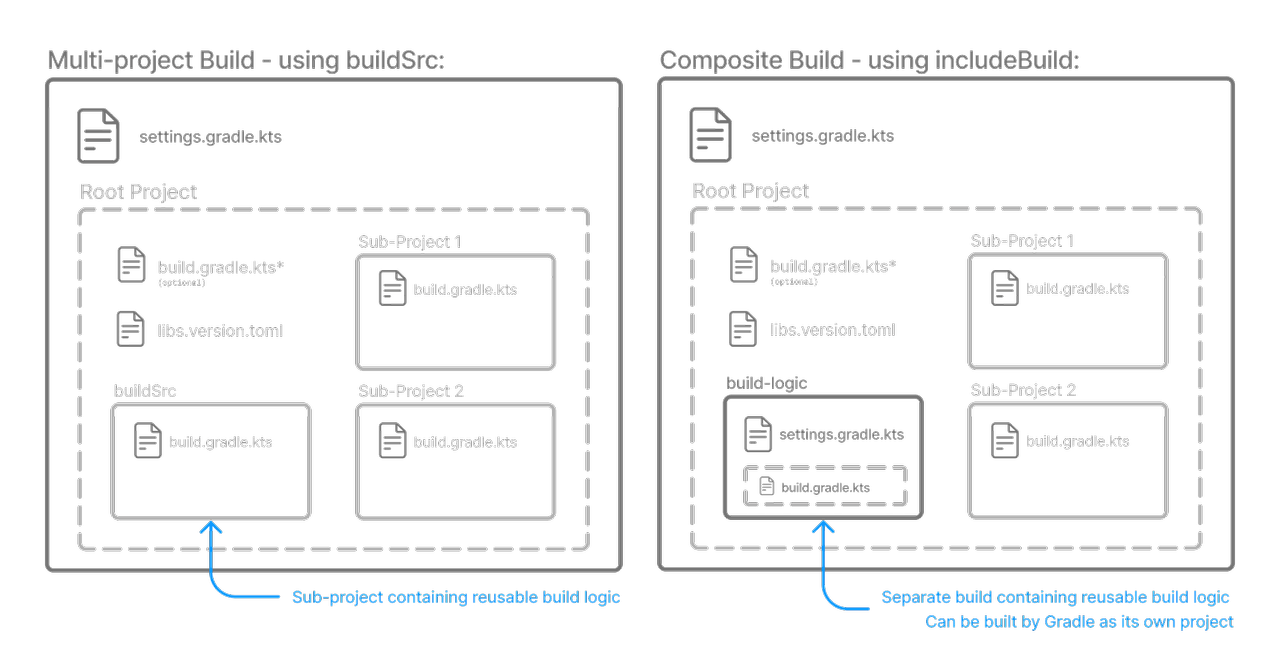
buildSrc is treated as a subproject, so projects belonging to the root project can pull in and use its build scripts.
build-logic, on the other hand, is treated as an included build directory, and projects belonging to the root project can likewise pull in and use its build scripts.
Operating things the build-logic way is what the official Gradle docs call a composite build.
Composite Builds, also referred to as included builds, are best for sharing logic between builds (not subprojects) or isolating access to shared build logic (i.e., convention plugins).
That quote comes straight from the Gradle documentation.
The key point of a composite build is isolating the build logic.
In other words, the difference between buildSrc and build-logic comes down to this: do you include build scripts in the build even when a particular project doesn’t use them, or not?
Which strategy you pick is a matter of taste.
Personally, I lean toward build-logic.
The reason: the bigger the project grows, the more build scripts you accumulate — and isolating them cleanly from the build stage onward feels like it gives you a performance edge.
With version catalog?
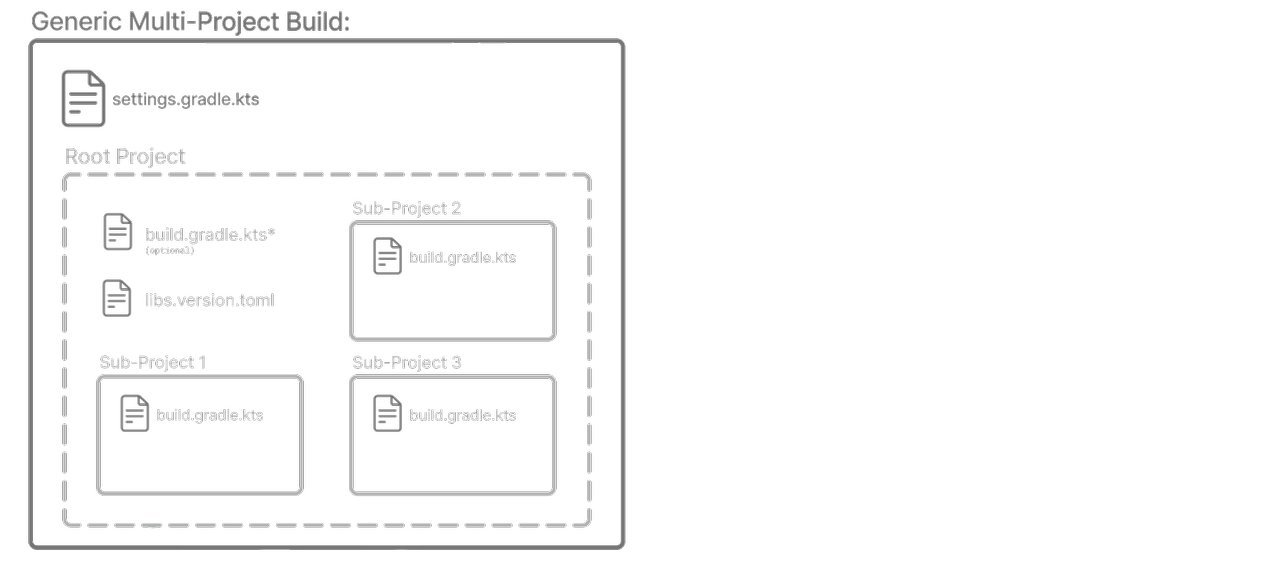
Originally, the goal was for pre-compiled scripts in a multi project setup to be fully compatible with Gradle’s version catalog for managing versions.
Unfortunately, pre-compiled scripts currently cannot reference the versions defined in a version catalog, which is a bit of a letdown.
Plenty of other people have felt the same friction, and — as you’d expect — workarounds are documented in the issue linked below.
Given how much interest it has attracted, surely the day it gets solved isn’t too far off. 😄
If you’re using a version catalog, either follow the link below and write some additional custom code, or accept the limitation and adopt the strategy of sticking to what’s provided out of the box.
Sample Repository
Here’s the sample repository I put together. It’s structured as the tree below:
1
2
3
4
5
6
7
8
9
10
11
12
- build-logic
  - build.gradle.kts
  - src/main/kotlin
    - project-conventions.gradle.kts
    - kotlin-conventions.gradle.kts
    - spring-conventions.gradle.kts
    - jib-conventions.gradle.kts
- order-application
  - build.gradle.kts
- product-application
  - build.gradle.kts
- settings.gradle.kts
What I’m sharing is only ever an example — feel free to slice your gradle.kts files into even smaller units to maximize reusability for your own project’s situation.
- huisam/spring-observability — Playground for spring observability based on opentelemetry
Summary
To wrap up today’s post:
- When building a Gradle multi module setup, it’s worth applying a way to reuse build scripts.
- The two ways to reuse build scripts are buildSrc (subproject) and build-logic (composite build).
- Pick whichever solution suits your taste, and manage your Gradle build scripts in style!